UboxDesktop
Watch your UBox cameras on a Mac or a Windows PC, without the phone app. AI-coded in Rust to be small and fast.
Why I made it
To keep an eye on my house renovation project, I bought a random cheap camera off Amazon, a Sehmua solar 4G camera (Amazon link). Like cameras from many other brands, it is made to work with the UBox app, from the Chinese company Ubia. The camera proved to be surprisingly resilient and useful. It runs on a solar panel and a battery, and connects over a cellular network, so it was ideal for a site with no Wi-Fi and no simple way to power a camera. But the camera only came with phone apps, and nothing for the desktop. So I made one.
Version 0.1.3 · free · for cameras that use the UBox app, sold as Sehmua, XEGA, Hosafe, SHIWOJIA, ESOE, Kentfaith and more
What it does
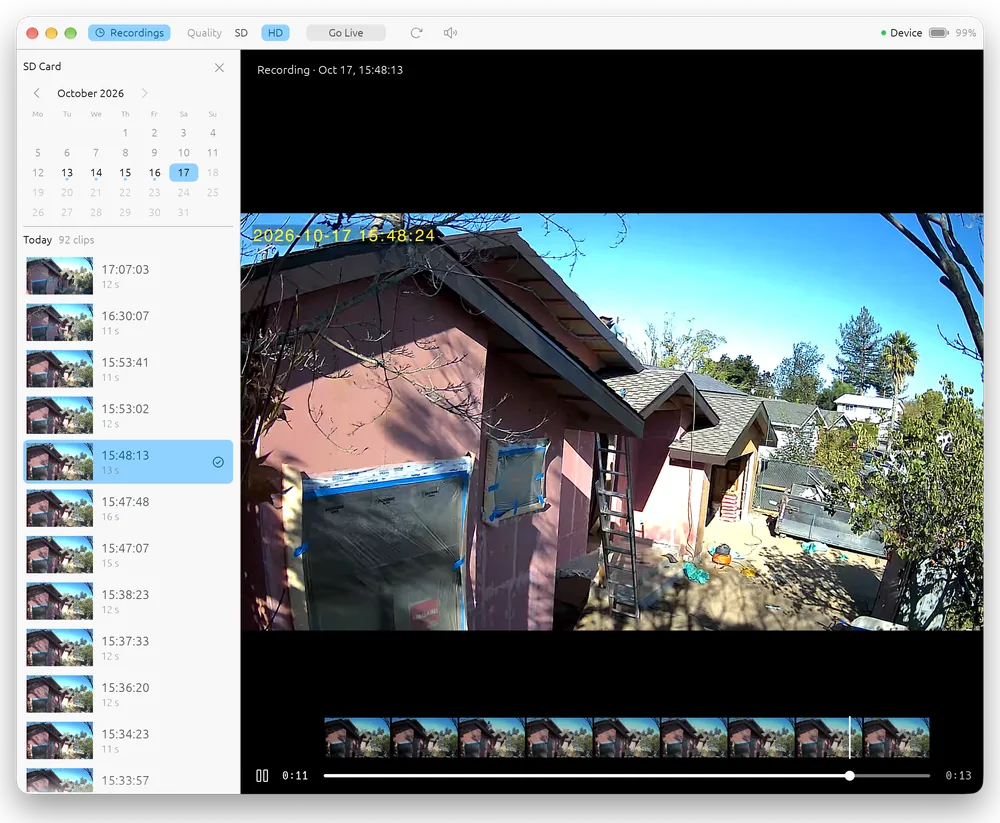
- Live video in SD or HD, with live sound
- Pan and tilt cameras that move: hold the arrow keys, or use the on-screen arrows
- Recordings from the camera's SD card: a calendar, thumbnails, and playback with a timeline
- Download a recording as an MP4 video, or keep it on your computer to watch offline
- Zoom into the picture with the scroll wheel or a pinch, and drag to look around
- Easy on battery and solar cameras: it connects only when you watch, pauses when you stop, and lets the camera sleep when your computer does
Your login and privacy
- You sign in with your UBox account, as in the phone app. The app talks only to the UBox servers, run by Ubia: to sign in, list your cameras, and reach them. There is no tracking and nothing is sent anywhere else.
- Your password is never stored. The app keeps the encoded form the UBox servers expect, in the macOS Keychain or Windows Credential Manager. It works like the password for your UBox account, so it is kept like one.
- Recordings you watch or download are kept on your computer only.
- Help › Save Diagnostic Report writes a log for bug reports only when you ask, with your account, camera names and IDs and IP addresses left out.
- Extra safety: create a second UBox account, share the camera to it from the phone app, and sign in with that one. You can remove the share at any time.
Questions
Is there a UBox app for PC or Mac?
The UBox app, by Ubia, is for phones only. UboxDesktop is an independent, free app that brings the camera to a Windows PC or a Mac: live view, the SD card recordings, and pan and tilt.
Which cameras does it work with?
Cameras that you use with the UBox phone app (by Ubia), including solar and battery cameras on Wi-Fi or cellular (4G). Most are sold under other brands, for example:
- Sehmua (such as the RBX-S40)
- XEGA
- SHIWOJIA
- TC40 solar trail cameras
- ESOE
- Hosafe
- Kentfaith 4G trail cameras
- LS Vision cameras that use the UBox app
- unbranded 4G solar, PTZ and trail cameras
It was made with a Sehmua solar 4G camera. If yours is set up in the UBox app, it should work. Cameras for the separate UBox Pro app have not been tried yet.
Do I still need the phone app?
Only to set the camera up and add it to your account. After that you can watch it from your computer.
Does it support RTSP or Home Assistant?
Not yet. UBox cameras don’t offer RTSP or ONVIF; UboxDesktop talks to them the way the phone app does.
Bugs and feedback
Found a bug, or have an idea for the app? Send me a direct message on X: @MartinViktora. Tell me which version you use, on Mac or Windows, and what happened.
Good to know
The Windows version is not signed yet, so Windows may show “Windows protected your PC” the first time. Click More info, then Run anyway. The Mac version is signed and notarized by Apple.
UboxDesktop is an independent app. It is not made by, affiliated with or endorsed by UBox or Ubia.